Step 1: Build a Blip Baseline with Docker
Step 1: Building a BLIP Baseline with Docker (aka "let's make the model talk")
Alright, this is where the magic starts.Before we jump into fancy training pipelines or GPU flexing, we need a solid baseline.
Think of this step as assembling IKEA furniture: if you mess this up, everything else becomes... emotionally difficult.
What are we doing here?
We are using Docker to spin up a clean environment and run a pre-trained BLIP (Bootstrapping Language-Image Pretraining) model locally.BLIP is great because it already knows how to look at images and describe them in human language.
Basically, it's the friend who captions everything on Instagram.
Why Docker?
Because your local machine is chaotic.Different Python versions, random libraries, mysterious bugs from 2 years ago... Docker isolates everything into a neat little box.
Translation: If something breaks, it's not your fault. It's the container's fault. Much better.
Project Structure (Simple but Powerful)
image-caption-app/
├── app/
│   ├── main.py
│   └── model.py
├── requirements.txt
└── Dockerfile
Dockerfile Setup
This is where we define our environment. Keep it clean, minimal, and slightly intimidating.FROM python:3.10-slim WORKDIR /app COPY requirements.txt . RUN pip install --no-cache-dir -r requirements.txt COPY . . CMD ["python", "app/main.py"]
Dependencies
BLIP lives in the Hugging Face ecosystem, so we need a few key libraries:torch transformers Pillow fastapi uvicorn
Loading the BLIP Model
Here's the fun part. We load a pre-trained BLIP model and processor.This is basically downloading a brain that already knows how to caption images.
from transformers import BlipProcessor, BlipForConditionalGeneration
from PIL import Image

processor = BlipProcessor.from_pretrained("Salesforce/blip-image-captioning-base")
model = BlipForConditionalGeneration.from_pretrained("Salesforce/blip-image-captioning-base")

def generate_caption(image_path):
    image = Image.open(image_path).convert("RGB")
    inputs = processor(image, return_tensors="pt")
    out = model.generate(**inputs)
    caption = processor.decode(out[0], skip_special_tokens=True)
    return caption
Yes, that's it. No PhD required.The model does the heavy lifting while you look smart.
Simple API with FastAPI
We wrap everything in a lightweight API so we can send images and get captions back.
from fastapi import FastAPI, UploadFile, File
import shutil

app = FastAPI()

@app.post("/caption")
async def caption_image(file: UploadFile = File(...)):
    file_path = f"temp_{file.filename}"

    with open(file_path, "wb") as buffer:
        shutil.copyfileobj(file.file, buffer)

    caption = generate_caption(file_path)

    return {"caption": caption}
Build and Run Docker
Now we turn everything into a container. This is the moment of truth.docker build -t caption-app . docker run -p 8000:8000 caption-appIf everything works, you should see something like:
Uvicorn running on http://0.0.0.0:8000Congratulations. You now have a working image captioning system running locally.
Not bad for step 1.
Testing the API
You can test it using curl, Postman, or just vibes.
curl -X POST "http://localhost:8000/caption" \
     -F "file=@your_image.jpg"
Expected result:
{
  "caption": "a dog sitting on a couch looking relaxed"
}
If your model says something weird like "a blurry object in existential crisis," don't worry.That's just AI being AI.
What You Just Achieved
Technically:- Deployed a pre-trained multimodal model
- Built an inference pipeline
- Containerized the entire system
- Exposed it via an API
Emotionally:
- You are now officially "doing AI"
- You resisted the urge to rage quit Docker
Why This Step Matters
This baseline is your control group.Later, when you train your own model or improve performance, you'll compare everything against this.
If your fancy model performs worse than BLIP... well... let's not think about that yet.
Step 1 is done. The model can see. The model can speak. The journey has begun.
Results
Here are the images that are uploaded: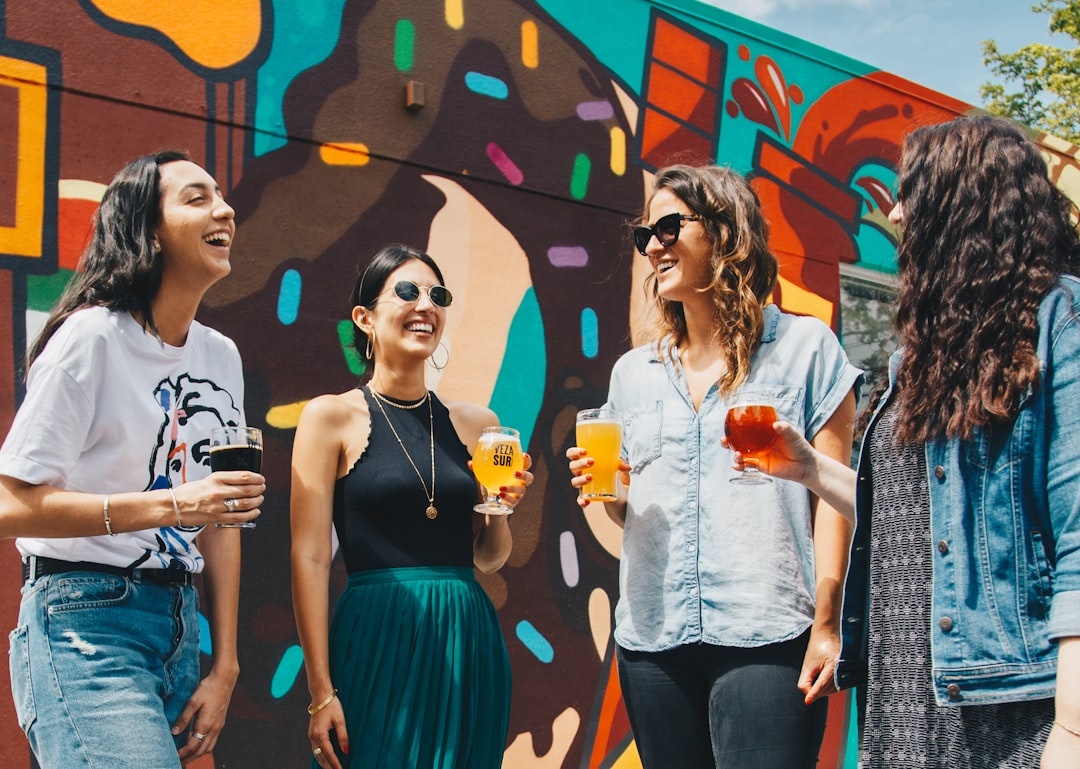

Here's the caption returned:
{
  "caption": "three women standing in front of a mural"
}
{
  "caption": "three people sitting at a table with laptops"
}
Any comments? Feel free to participate below in the Facebook comment section.